Increase conversion rate: 15 proven measures for more website sales
You invest hundreds or thousands of francs in Google Ads and social media, your website has solid traffic, but at the end of the month you're still wondering where the customers have gone? In this article, you'll learn 15 proven measures to turn your existing visitors into significantly more customers.

Measures that can be implemented immediately to increase the conversion rate
1. Optimize call-to-action buttons
The call-to-action button is where it is decided whether an interested visitor becomes a customer. Most buttons fail due to three avoidable mistakes.
Choose the right color and contrast
Your CTA must be eye-catching at first glance. This works with a well-chosen contrast. If your site is primarily blue, an orange button is immediately seen. Red almost always works well on white backgrounds because it signals urgency.
Test different colors, but keep your target group in mind: B2B customers often respond better to muted colors such as dark blue or green, while end customers are more likely to respond to strong signal colors.
Size and position
Your button should be big enough to easily tap on a mobile phone. At least 44 x 44 pixels, better more. Always place it in the visible area without the user having to scroll. This is called "above the fold."
For longer pages, repeat the CTA after each important block of content. Rule of thumb: A button should be visible at least every 3 to 4 screen heights.
Specific calls to action instead of general statements
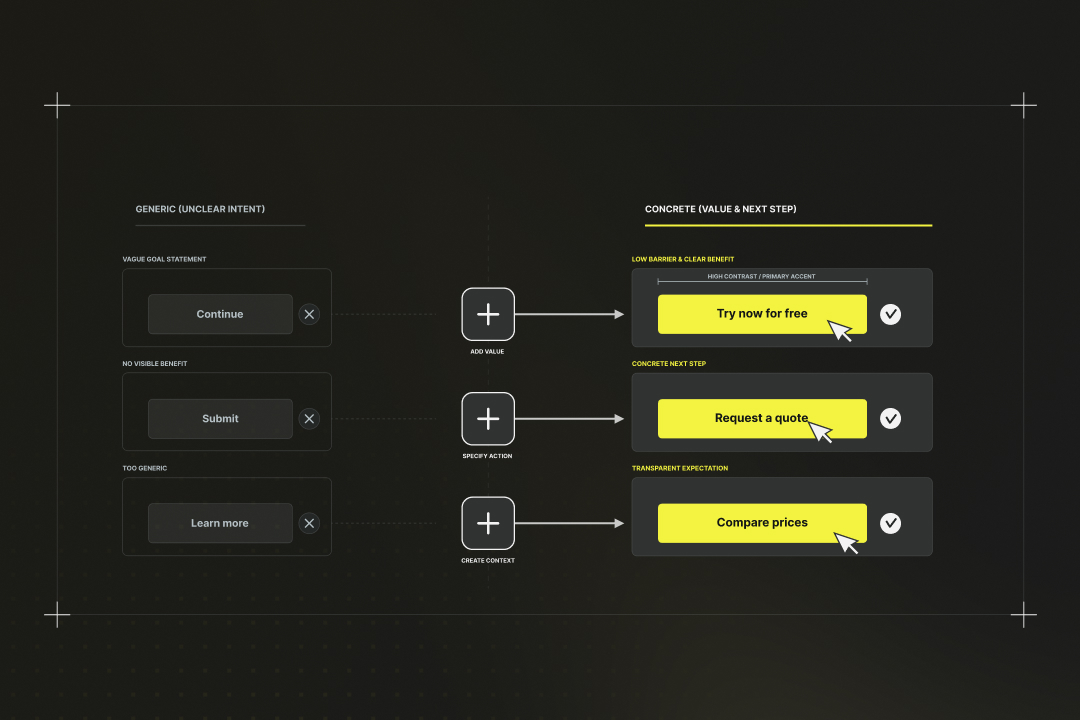
"Next" or "click here" doesn't tell the user what's happening. Instead, use comprehensible calls to action:
- Instead of "Next" → "Try it now for free"
- Instead of "Send" → "Request a quote"
- Instead of "Learn more" → "Compare prices"
The text should make clear what the next step is and the benefit of clicking. People only act when they know what they're getting in return.
Always consider mobile optimisation
Well over half of your visitors see your website on their smartphones. Space is scarce on small screens. Your CTA must still be prominently visible and easily accessible. Test your buttons regularly on various devices. What looks perfect on the desktop can get lost on the smartphone or be hard to tap.
2. Shorten and simplify forms
Each additional form field costs you customers. It's one of the hardest lessons in online marketing, but also one of the most valuable.
Keep only the necessary fields
Go through your registration form and ask yourself for each field: "Do I really need this information right now?" We often collect data that we won't use later anyway, or that we can ask for after the purchase.
An example: For a newsletter, all you need is the email address. The first name is nice, but even that is optional. You can always ask for last name, phone number and company size later, once the customer has already built trust.
Rule of thumb: More than three mandatory fields for the first sign-up is already too many.
Enable guest ordering
Nobody wants to create a customer account for a single purchase. Yet many shops force their visitors to do so. The result: masses of abandoned purchases right before the finish line.
Therefore, always offer a guest order. After the purchase, you can still suggest the customer creates an account — the barrier is much lower then, because they are already satisfied with their purchase.
Progress indicator for multi-step forms
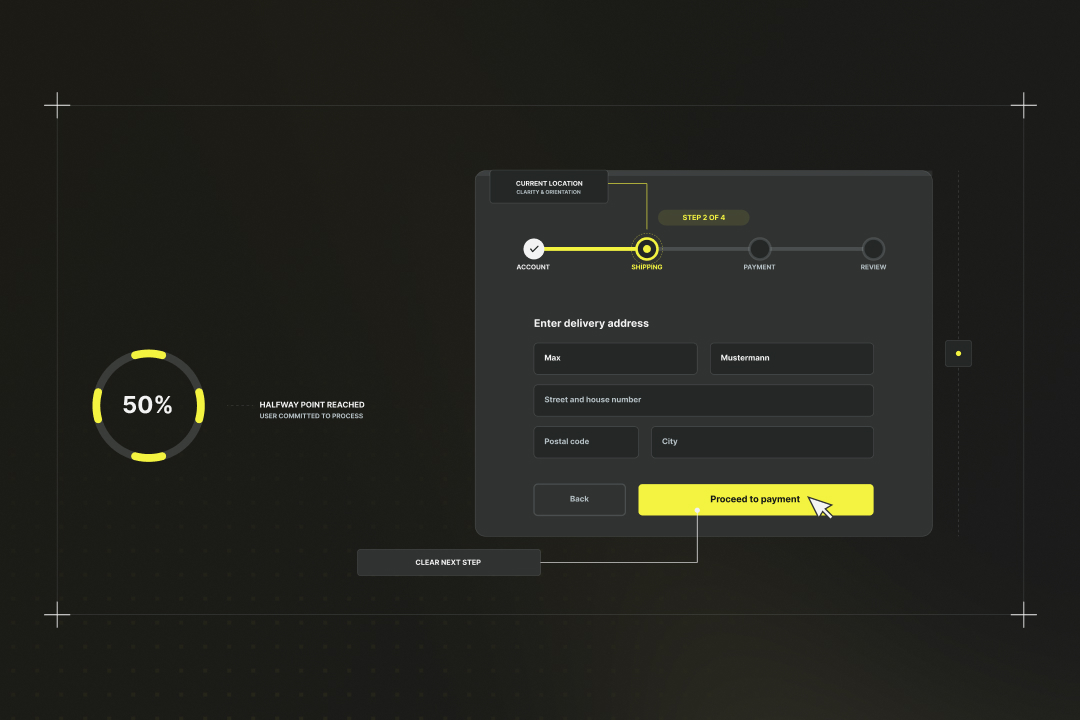
If your ordering process has several steps, show the customer where they are right now. A simple "Step 2 of 4" progress bar gives them the feeling that the goal is within reach.
Formulate clear error messages
"Invalid input" doesn't help anyone. Explain specifically what is wrong: "The email address must contain an @ sign" or "The password must have at least 8 characters." Mark incorrect fields in colour and place the error message right next to them so the user immediately knows what needs to be corrected.
3. Improve load times
One extra second of load time costs you 7% of your conversions. With a three-second delay, 40% of your visitors will drop out before they even see what you're offering.
Google has proven this in numerous studies: website speed directly influences your conversion rate. A page that loads in under a second converts significantly better than one that takes four seconds.
It gets particularly merciless on mobile devices. Here, users expect everything to be there immediately. Anyone who waits longer is gone — often for good.
Measure your current speed
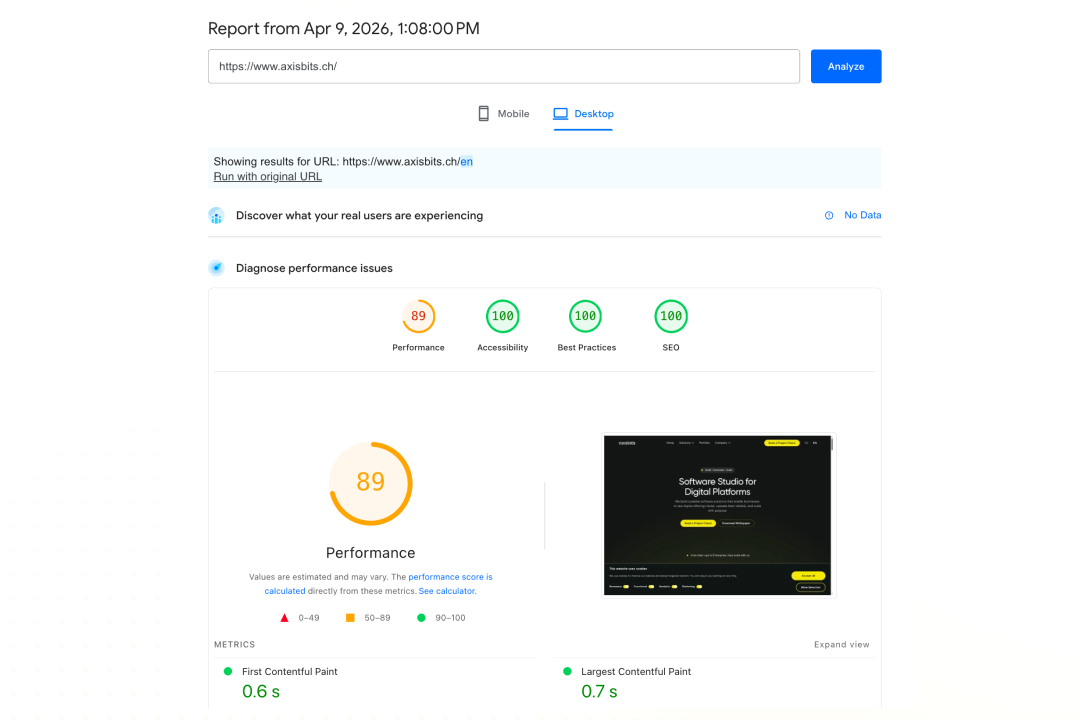
Before you optimise, you need to know where you stand. Google PageSpeed Insights is free and shows you the most important issues. Just enter your URL and you'll see both desktop and mobile performance.
The most important optimisation measures
- Images are often the biggest bottleneck. Compress them before uploading and use modern formats such as WebP. An image that was originally 2 MB usually works just as well at 200 KB.
- Remove unnecessary plugins and scripts. Each additional element has to be loaded and takes time. Ask yourself about every plugin: "Is that really necessary?"
- Use a content delivery network (CDN). Cloudflare offers a free plan that automatically distributes your site worldwide, making it faster.
Set up caching
Caching stores frequently used data and makes revisits lightning fast. Most hosting providers now offer this as a service.
Plugins such as WP Rocket or W3 Total Cache help with WordPress. The basic settings are usually sufficient to achieve noticeable improvements.
4. Optimise mobile experience
Simplify navigation
What looks clear on the desktop becomes chaos on the mobile phone. Use a hamburger menu and limit yourself to the most important items. Each additional click costs you mobile users.
Optimise checkout
This is where most mobile conversions fail. Use large input fields and offer mobile-accessible payment methods such as Apple Pay. Test your checkout regularly on different devices, because what works on the iPhone may look different on Android.
Create trust and reduce doubt
5. Use social proof strategically
People buy what others have already bought and apparently found to be good. You can use this basic psychological principle specifically to improve your conversion rate.
Place customer reviews correctly
Place reviews right where purchase decisions are made: at the products and at checkout. A 4.7-star rating right next to the "Buy" button is stronger than ten testimonials buried in the footer.
Show imperfect reviews too, because that creates credibility. Buyers trust a mix of 4- and 5-star reviews more than nothing but perfect scores.
Communicate the number of satisfied customers
"Over 10,000 satisfied customers" or "Already sold 5,000 times" are concrete trust signals. People follow the crowd, particularly with unknown providers.
Update these numbers regularly and be honest. "Over 1,000 customers" is better than an inflated "millions of users."
Testimonials with faces
A quote with a photo and full name is ten times more effective than anonymous feedback. Ask your satisfied customers for a short testimonial with a picture — most are happy to help.
Success stories are ideal: "Thanks to the software, I save 3 hours a week" instead of "Great product, can recommend."
Show live activity
"12 people are looking at this product right now" or "Bought in Berlin 5 minutes ago" create urgency and relevance. Tools such as Proof or FOMO can automate this. Don't overdo it though — too many pop-ups are intrusive and put people off.
6. Communicate guarantees and return policy
Doubt is the biggest conversion killer. People hesitate because they are afraid of making the wrong purchase. Relieve them of this fear with clear guarantees.
Show money-back guarantee prominently
Place your money-back guarantee right next to the buy button. "30 days money back" massively reduces the perceived risk. Most customers never use the guarantee anyway, but they buy because they have it. Make the guarantee clear and simple: "Satisfaction or money back" instead of complicated conditions in legal language.
Free shipping and returns
Shipping costs are a common reason for purchase abandonment. Instead, include the costs in the product price and advertise "free shipping." Psychologically, this has a stronger effect.
Free return shipping goes one step further and lowers the barrier even more. Zalando has perfected this and transformed an entire industry.
Make security certificates visible
SSL certificates, Trusted Shops seals or similar security signs belong in the checkout and on the homepage. People only buy where they feel their data is safe. Briefly explain what the seals mean. "SSL-encrypted transmission" means less to many customers than "Your data is secure."
Explain easy returns
Describe the return process in three simple steps: "1. Pack the parcel, 2. Print the return label, 3. Drop off the parcel." The simpler it sounds, the fewer concerns buyers have.
7. Create price transparency
Hidden costs are a trust killer. Show all prices honestly and transparently. This builds more trust than supposedly cheap bait offers.
Show all costs immediately
Include shipping costs, taxes and fees directly in the displayed price, or list them clearly. Unpleasant surprises at checkout account for 70% of purchase cancellations.
Use tools like pricing calculators that show all costs at a glance. Transparency always wins over cheap tricks in the long run.
Communicate shipping costs
"Free shipping over 50 CHF" is better than a hidden 9.90 CHF in the last checkout step. People plan their purchases accordingly and are less annoyed.
Show delivery times alongside: "Free shipping in 2–3 working days" gives the customer all the important information.
Optimise content and user guidance
8. Optimise the above-the-fold area
The first few seconds of visiting a website determine success or failure. What visitors see immediately determines whether they stay or leave.
Communicate your value proposition immediately
Your main benefit must be clear in one sentence: "Save 50% of your accounting time" or "Double reach with half the effort." People scan rather than actually read. Place the value proposition prominently. Everything else is secondary.
Main benefit visible in 3 seconds
The visitor should immediately understand: What are you offering? For whom? What is the benefit? Answer these three questions in the visible area, without scrolling. Test this with the 5-second rule: Show strangers your homepage for 5 seconds. What they can say about your offer afterwards is what your website visitors also understand.
Eliminate distractions
Remove anything that distracts from the main goal: superfluous menu items, too many buttons, irrelevant content. Each option you offer reduces the likelihood of the desired action.
9. Improve product pages
Your product page must answer three questions: What is it? What does it do for me? Why should I trust you? Create clarity in all three areas.
High-quality images with multiple views
A picture is worth a thousand words, but only if it shows the product correctly. Use at least 3–4 views: overall view, details, product in use, size comparison.
Enable zoom functions. People want to see details before they buy. Blurry or too-small images give the impression of cheap quality. Videos work even better: 30 seconds of product video can further boost the conversion rate.
Benefit-oriented descriptions
Write about benefits, less about features. Instead of "500 GB storage," write "space for 100,000 photos." People buy solutions to their problems, not technical specs.
Structure descriptions with bullet points and paragraphs. Long blocks of text put people off. Use bold text for the most important points.
Answer frequently asked questions
Collect the questions customers ask over and over again and answer them directly on the product page. "Is this also suitable for beginners?" or "Does it work with my system?" are typical doubts. The fewer questions remain unanswered, the fewer reasons there are to postpone the purchase.
10. Streamline the checkout process
Checkout is your most important sales funnel. This is where it is decided whether interest becomes a purchase. Any friction that arises costs you money.
Implement a one-page checkout
Spread the buying process over as few pages as possible. Ideally, everything fits on one page: product overview, delivery address, payment method, confirmation. Multi-page checkouts only work if every step has a clear benefit. Otherwise, customers drop off between pages.
Prioritise guest ordering
Make guest ordering the default, account creation an option. "Order as a guest" should be the most prominent button. You can still offer customers an account after a successful purchase.
Offer multiple payment methods
PayPal, credit card, invoice, instant transfer: the more options, the fewer cancellations. People have different preferences and options for payment. Mobile payments such as Apple Pay or Google Pay reduce the mobile cancellation rate in particular.
Personalisation and segmentation
11. Target group-specific landing pages
A landing page for everyone is a landing page for no one. People convert better when they feel directly addressed.
Optimise for different traffic sources
Visitors from Google Ads have different expectations from those coming from Facebook or email campaigns. Google visitors are actively looking for solutions; Facebook users are more likely to discover your offer by chance.
Create specific landing pages for each channel: Google visitors want facts and prices quickly, Facebook users need more explanation and emotional appeal.
Make seasonal adjustments
Christmas gifts are advertised differently from summer products. Adapt your landing pages to current events and seasons. "Just in time for Christmas" works in December, "Fit for summer" in spring.
12. Use exit-intent pop-ups correctly
Exit-intent pop-ups catch visitors who are already about to leave. Used correctly, they can bring 10–15% additional conversions.
Define timing and triggers
The pop-up appears when the mouse pointer moves towards the browser close button or has been inactive for a while. The signal is clear: the visitor wants to leave. However, only show such a pop-up once per session. Multiple interruptions will drive users away for good.
Offers that work
Discounts are the classic: "10% off your first order." But other incentives work too: free shipping, exclusive content, extended trial versions.
The offer must be redeemable immediately. "Subscribe to our newsletter for future discounts" is weaker than "Save 15% now."
Design and formulation
Keep the pop-up simple: a clear headline, short text, one button. Too many options confuse.
The close button must be clearly visible. Users who really want to leave should be able to — everything else frustrates and damages your brand.
Exit-intent pop-ups can increase your conversion rate by 10–35%, especially for e-commerce websites with higher cart values.
Systematic testing and optimisation
13. Conduct A/B testing systematically
A/B testing shows you what really works on your website. It allows you to gradually remove poorly performing elements and tailor your page to what resonates with users.
What to test (priority list)
First, test the elements with the biggest impact: headlines, call-to-action buttons, prices and value propositions. A new main headline can do more than ten small design changes.
Then come the details: button colours, form length, product images. Only test one variable at a time, otherwise you'll never know which change made the positive difference.
Prioritise tests based on effort vs. potential gain. A new headline is created in 10 minutes; a completely new design takes weeks.
Test duration and sample size
Let tests run for at least a week to account for weekday effects. With low traffic, you'll need longer for statistically relevant results. You need at least 100 conversions per variant for meaningful results. At a 2% conversion rate, that means 5,000 visitors per variant.
Never end tests early, even if one variant looks better sooner. Short-term fluctuations can be misleading.
Understanding statistical significance
95% confidence means: with 95% probability, the result is not a coincidence. Anything below that is gambling, not a reliable test. Tools such as Google Optimize or Optimizely calculate this automatically. Rely on the numbers rather than your first impression.
Tip: Here you can find A/B testing tools.
14. Analyse heatmaps and user behaviour
Heatmaps show you what users really do. This data is particularly valuable for your optimisation.
Where do users actually click?
Click maps reveal which areas are ignored and which receive a surprising amount of attention. Users often click on images or text that are not links at all. These are signals that they expect a function there, for example to enlarge the image.
Understanding scroll behaviour
Scroll maps show how far users scroll down your page. Important content should be placed where it is actually seen.
Place call-to-actions where most users are still active. Content that only 20% of visitors see is a missed opportunity.
Here you can find out more about website heatmaps.
Use session recordings
Watch real user sessions to discover problems that get lost in aggregate numbers: Where do they hesitate? Where are they searching in vain? Where do they click the same element multiple times?
Analyse drop-off sessions in particular: what did users do before they left? These insights are often more valuable than success analyses.
15. Establish continuous optimisation
Conversion rate optimisation is a marathon. Establish a process that works even without your constant attention.
Define monthly review cycles
Set aside an hour for conversion analysis on the first Monday of every month. Which tests have been run so far? What did the heatmaps show? Where have new problems emerged?
Create a standard agenda: check figures, plan new tests, evaluate ongoing optimisations. Routine prevents important insights from getting lost.
Documenting learnings
Keep a simple table of all tests: what was tested, what the result was, what action was taken. This history becomes extremely valuable over time.
Document failed tests too. "Button colour red vs. green: no difference" saves you from unnecessary repetitions later. Share insights with your team. What works in the shop can also help with landing pages or emails.
Define a process for the team
Determine who tests what and how decisions are made. Wild experiments without coordination lead to chaos and wrong conclusions. Use tools like Trello or Notion for project planning. Each test gets a card with hypothesis, duration and expected result. Set realistic goals: one test per month is better than five tests that are never properly evaluated.
Create a pipeline for new ideas
Continuously collect optimisation ideas from customer feedback, support requests and team brainstorming sessions. The best ideas often come from direct customer contact.
Evaluate ideas based on impact and effort. Quick wins first, and save bigger projects for quieter periods.
Measurement and success monitoring when increasing conversion rates
Set up your tracking so that you gain real insights:
- Define key metrics: Conversion rate is the main indicator, but also look at: average order value, checkout abandonment rate, time to conversion. These figures give you the full picture.
- Define micro-conversions: newsletter subscription, product page visited, video watched. These early signals help you identify issues before they affect revenue.
- Use Google Analytics 4: Set up conversion goals for every important step and use funnel analysis. Which step loses the most users? That is where your greatest optimisation potential lies.
- Segment your data: mobile vs. desktop, new vs. returning visitors, different traffic sources. Every group behaves differently.
Think economically about your optimisation measures and calculate the ROI:
- Value calculation of conversion increases: an increase in the conversion rate from 2% to 2.5% brings an additional 5,000 CHF in revenue per month with 10,000 monthly visitors and an average order value of 100 CHF. At a 20% margin, that's 1,000 CHF of additional profit every month.
- Costs vs. benefits of testing: an A/B test mainly costs time: 2 to 4 hours per test. At an hourly rate of 100 CHF, a test costs 200 to 400 CHF. But if it increases your conversion rate by 10%, it usually pays for itself in the first month.
- Document how long effects last. Some A/B test winners lose their effect after weeks (novelty effect).
Increase your conversion rate with Axisbits
Whatever measures you want to implement: they always cost you time. Planning tests, evaluating results correctly and making changes are important steps that you must consciously dedicate yourself to. That rarely works on the side.
If you're working on better conversion rates but are overwhelmed by the time required, we can handle A/B testing and ongoing conversion rate optimisation for you. You take care of your business, we'll take care of your numbers.
Let's look together at where your greatest potential lies. In a free initial consultation, we analyse your most important pages and show you the three most important optimisation steps for your business.
{{fs-btn-cta}}
Wir schaffen leistungsstarke Plattformen und Websites für Startups, Scale-Ups und KMUs, von Konzept bis Go-Live.
We systematically increase your conversion rate with A/B testing and proven CRO methods — month by month!
Increase conversion rate — frequently asked questions and answers
Quick wins, such as better call-to-action buttons, often show initial results after just a few days. For statistically reliable results, you need at least 100 conversions per variant, which takes 2-6 weeks depending on traffic.
Start by optimizing call-to-action buttons, then shorten forms and check the mobile experience. Pay particular attention to your figures: The biggest weak point has top priority.
Yes, but different from A/B testing. Focus on user interviews, heat maps, and session recordings. Use proven best practices instead of your own tests, these almost always work
Most conversion increases are the result of small, targeted changes. Better headline text or simplified forms often do more than just a complete redesign. Major modifications are rarely necessary.
More articles

Many teams experience Sprint Planning in one of two extreme ways: either as an endless meeting that drags on for three hours and still provides no clarity, or merely as a ticket-shuffling exercise in Jira that could just as easily have been handled via email. Neither of these approaches aligns with the true purpose of Sprint Planning.

According to the swissICT Digital Excellence Report, only 35 percent of Swiss companies are on track with their digital alignment. For 26 percent, there is significant need for action (Source: swissICT). Companies invest in tools, cloud services, and AI pilot projects without a plan that holds it all together. The result: fragmented system landscapes, duplicated work, and budgets that don't flow where they have the most impact. The right IT strategy is the answer to this.

Artificial intelligence is now an established tool in software development, integrated directly into the programming environment. Developers spend less time writing boilerplate code and can instead focus on how the different parts of an application logically interact.