Guide: Optimize your website, rank on Google, convince visitors
A lot of money and time has already gone into your website, but so far has it been and will it remain a mere minus business? If your page doesn't appear on Google, visitors quickly drop off, or the design looks dated, it's time for a thorough optimization. In this article, you'll find our guide to website optimization, typical problems and initial solutions that you can use right away.

Optimize your website: 10 quick wins
- Revise home page: Clear message, clear offer, visible call-to-action, no long presentation of the company
- Optimize images: Replace unnecessarily large files, use WebP
- Maintain meta data: Give each page a meaningful title & description
- Streamline navigation: Hide or combine unimportant menu items
- Strengthen internal linking: Connect main pages with each other in a targeted manner
- Shorten forms: Show only necessary fields, test the technical function
- Enable HTTPS: If you haven't already done so, switch over immediately
- Check mobile view: Test on real devices, not just in the desktop editor
- Revise CTAs: Tailor visibility, language, placement to the user
- Set up uptime & monitoring: Automatically check if your site is available
What does it mean to optimize a website?
Optimizing a website usually means that there are various negative symptoms that should be addressed. After optimization, the website should then serve the actual goal of the website more. That could be faster loading times, more visitors, more revenue, and other goals.
Whether a page looks good is secondary if it loads too slowly, isn’t found, or no one knows where to click. So when we talk about optimizing a website, it can mean several things, even in combination:
- Technique: The site is slow, partly outdated, etc. It should be stable, fast, secure and mobile-friendly again.
- Too few visitors are coming to the website: The website should therefore be optimised for search engines in order to be easier to find there.
- There may be visitors, but they don’t buy/book: In this case, conversion optimisation is required, i.e. visitors should be more convinced of the purchase.
In many companies, the website was set up once and then not fundamentally questioned for a long time. Perhaps a text was adapted here and there or an image was exchanged. But the basis often comes from a time when requirements, target groups or technical standards were completely different.
Know or define the goal of website optimisation
So before you start working on your website, you should clarify where this should lead in the first place. Because optimisation is not an end in itself, but should help achieve specific goals.
For most companies, it involves one or more of these things:
- Resolve technical issues: The website loads slowly, links or forms lead nowhere.
- More visibility: better rankings on Google in order to be found at all
- More leads or inquiries: via contact forms, downloads or appointment bookings
- More trust: through a clear, professional appearance that shows your competence
- More revenue: for example in the shop or through targeted referrals to offers
- Better user experience: so that visitors find their way around and enjoy staying
These goals influence what you optimise and how. A company with stable Google visibility but poor conversion will want to optimise the website differently than one that barely has any visitors because it is not even noticed by search engines due to technical or content issues.
What does a website need to be high-performing?
A good website loads quickly, is found on Google, guides users safely through the content and delivers results. That is exactly what many existing pages lack.
It is not about rebuilding everything, but about starting where there is real impact. The most important factors are:
- Technical stability: The site must run securely, even on mobile and with high traffic.
- Loading time: Every unnecessary fraction of a second costs users and visibility.
- Structure & content: Anyone who doesn’t immediately understand what it’s about bounces.
- Search engine optimisation (SEO): Without visibility on search engines, there is no traffic. That’s why Google, Bing and Co. need to understand your website.
- User Experience (UX) & Conversion: Orientation, trust and clear course of action determine whether visitors become customers.
These areas are intertwined. And that is exactly why there is little point in working only on visual design, for example. If you want to optimise your website, you first need to look at it as a whole and only then target the weak points. So first list the problems with your website and then proceed step by step.
Website optimisation guide: identify, analyse, fix problems
Some website issues are closely related, so solving one will also fix the other. Conversely, this also means that a well-intentioned attempt at a solution with too little know-how will break more than it fixes. Therefore, only approach things that you are certain of being carried out. Call in help for everything else.
1. How can I optimise the loading time of my website?
The page loads noticeably sluggishly, especially on mobile devices or when the network is slightly worse. Users leave before content is visible.
How you recognise it:
- Long load time of several seconds (mobile or desktop)
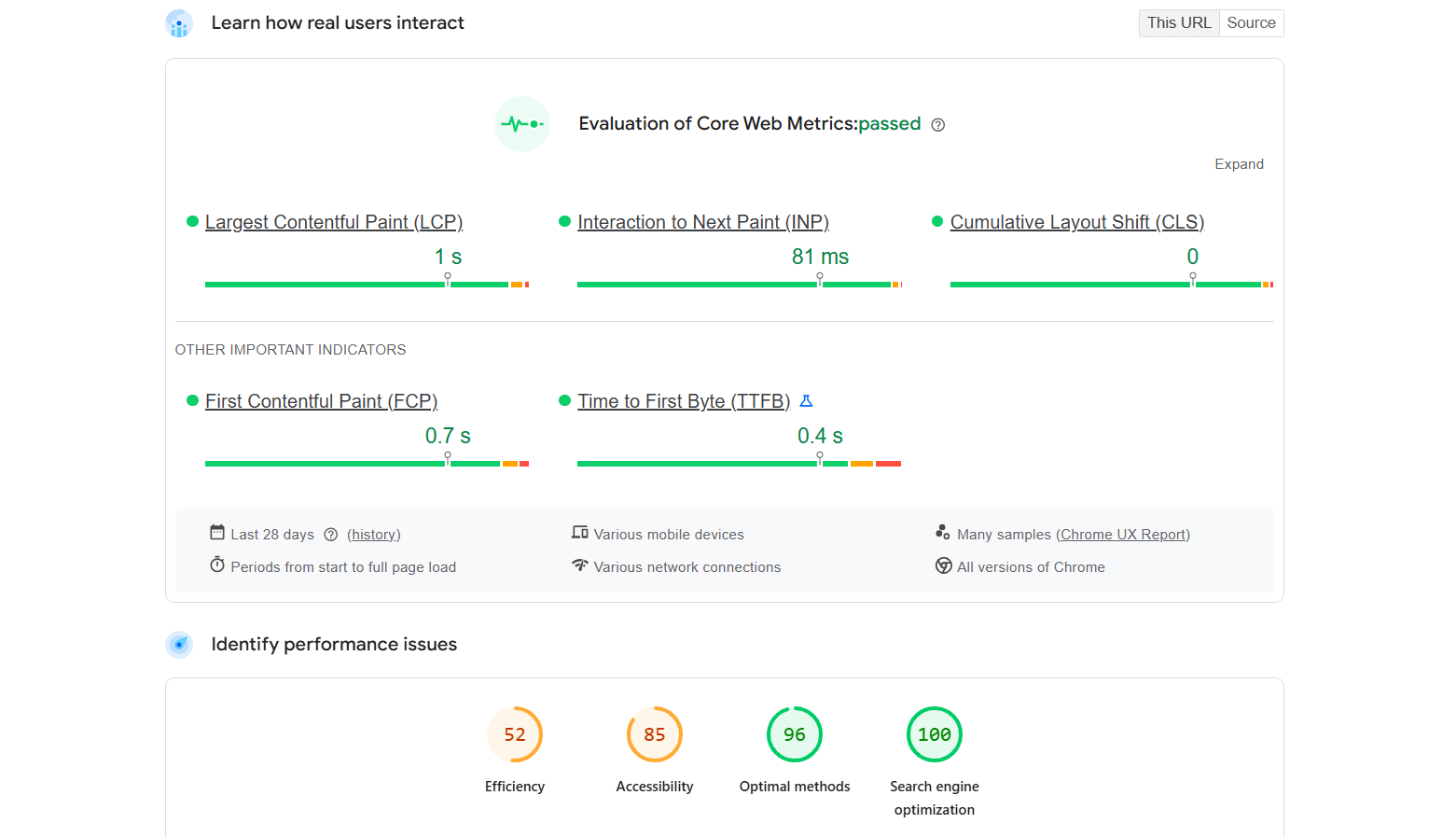
- Poor rating in Google PageSpeed Insights
- Core Web Vitals show slow interactivity or layout shifts
- High bounce rate on landing pages, particularly on mobile devices
What you should check and how:
- Image size and format: Open pages in the DevTools network analysis (Chrome → right-click → “Inspect” → “Network” tab) and view the loaded files.
- Number and size of scripts and stylesheets: Also visible via DevTools.
- Server response time and caching: Test with tools such as PageSpeed Insights, GTmetrix, or WebPageTest.
- Mobile loading time: Test on mobile with Wi-Fi disabled.
What you can do specifically:
- Reduce images to the appropriate size, convert to WebP, enable lazy loading
- Minify and bundle CSS and JS files, remove unnecessary scripts
- Enable browser caching and GZIP compression on the server
- Check the hosting setup, switch to higher-performance hosting if necessary
- Use a CDN (Content Delivery Network) for global performance improvement
2. How can I optimise my website for search engines?
Your page doesn’t appear in search results for important search terms, or only far down.

How you recognise it:
- Hardly any visitors via Google even though content is available
- Pages aren’t indexed or listed with warnings in Google Search Console
- Your content appears on Google under incorrect or irrelevant terms
- No visible entry for industry-typical search queries (“Attorney Basel”, “Webdesign KMU Zürich”)
What you should check and how:
- Indexing: Check in Google Search Console under “Pages.” Do important URLs appear there?
- Correct page title and meta descriptions: Analyse in the source code or via Screaming Frog SEO Spider
- Keyword search: Search for your target terms on Google. Does your site even appear?
- Structure and hierarchy: Are headings clearly structured? Is there a sensible page architecture?
What you can do specifically:
- Select only one topic (main keyword) per page, map it cleanly in H1, title, meta description and URL
- Avoid duplicate content, keep topics separate and set a clear internal linking structure
- Add structured data to better explain content to search engines
- Revise content: become more specific, offer clear value instead of advertising promises, write specifically for the target group.
- Fix technical errors (redirects, 404 pages, noindex tags)
Important: Search engine optimisation (SEO) is a huge topic that now encompasses numerous individual professional roles. It is therefore impossible to give a blanket and concise answer as to why a website is performing poorly on Google or how to optimise a website for Google.
The solutions shown here are therefore intended as initial starting points. If you find these symptoms on your site and can’t fix them yourself, it is advisable to seek help.
Tip: Your website barely gets any visitors and your first check already shows more SEO problems than you would have thought? Get in touch with us and we can discuss initial solutions for your website.
3. How can I get more enquiries via my website?
There is regular traffic, but it quickly fizzles out. Visitors click around a little and then disappear without taking any action.
How you recognise it:
- No or extremely low conversion value despite stable visitor numbers
- Forms are rarely submitted
- Users even stay for a while but drop out, e.g. before the last step
- Heatmaps or session recordings show: there is a lot of scrolling but little clicking
What you should check and how:
- CTAs visible and understandable? Open your site as someone who has never been there: do you immediately see what you should do? Also test this with friends or test subjects.
- Short and technically stable forms? Test every form yourself (mobile and desktop), check load times after submission.
- Building trust: are there customer testimonials, seals, references, clear language?
- Is the offer understandable? Read the homepage or offer page critically: is it clear who this is for and what it delivers?
What you can do specifically:
- Make CTAs larger, higher-contrast and more precise (e.g. “Get non-binding advice now”)
- Shorten forms, keep only truly necessary fields, keep the barrier low
- Strengthen trust through customer logos, quotes, guarantees or clear language
- Declutter content — away from empty phrases, towards value propositions
- Optimise the thank-you page and follow-up processes (confirmation, email, next step)
4. Why does my website look so cluttered?
Your site no longer looks up to date, whether visually, structurally or functionally. Users don’t seem comfortable or can’t find what they’re looking for.
How you recognise it:
- Feedback such as: “I couldn’t find my way around” or “It was somehow confusing”
- Very short time on page despite thematically relevant content
- Unclear entry point — the user doesn’t immediately know what it’s about
- Mobile display with shifted elements, fonts that are too small, buttons that are hard to click
What you should check and how:
- Visual hierarchy: what catches the eye first? Are there orientation points?
- Navigation logical and streamlined? Analyse menu structure: are important topics easily accessible?
- Check mobile presentation: try out different smartphones and tablets
- Design consistency: consistent fonts, colours, button styles?
What you can do specifically:
- Limit main navigation to max. 5–7 items, sort the hierarchy logically
- Revise fonts, colours, layout — think mobile first
- Use whitespace more deliberately: let content breathe rather than crowd it
- Make CTAs prominent and self-explanatory
- Optional: define or revise a design system (for consistency in look)
What can you optimise about the website yourself?
Not every optimisation requires an agency or a complete redesign. Some problems can be tackled yourself with the right tools, a little time and effort.
What you can optimise yourself:
Loading times:
Optimise images, remove unnecessary plugins, work through PageSpeed reports. With some familiarisation, this is also possible without a developer.
SEO basics:
Formulate and set up meta data cleanly, revise internal links, clearly structure content. Much of this is editorial groundwork.
Use tools for analysis:
With Google Search Console, Google PageSpeed Insights or Hotjar, you can identify weak points yourself and derive initial measures.
Tip: We advise against always addressing every problem with a plugin. A number of promising plugins only unnecessarily bloat your site and often get in each other’s way.
The desire to solve a difficult problem with such a shortcut is more of a sign that a professional should take a look at the matter.
When a service provider should optimise your website:
If you don’t have in-house expertise or capacity.
Technical optimisations, such as server configuration or a clean SEO setup, are error-prone if you don’t know exactly what you’re doing. If done incorrectly, they also cause further, sometimes even more serious problems.
When it comes to major structural changes or design issues.
UX, UI, responsiveness or a new content architecture require a lot of experience and someone who also thinks the whole thing from a user’s perspective.
If your site is technically out of date.
Outdated CMS, missing security updates or error-prone templates are a clear case for a professional re-setup.
Tips for optimising your website
Many website problems can be identified and resolved directly with a little effort. The following tools, tips and methods will help you achieve visible results quickly.
Website optimisation tools
- Google PageSpeed Insights: checks loading times and technical weaknesses
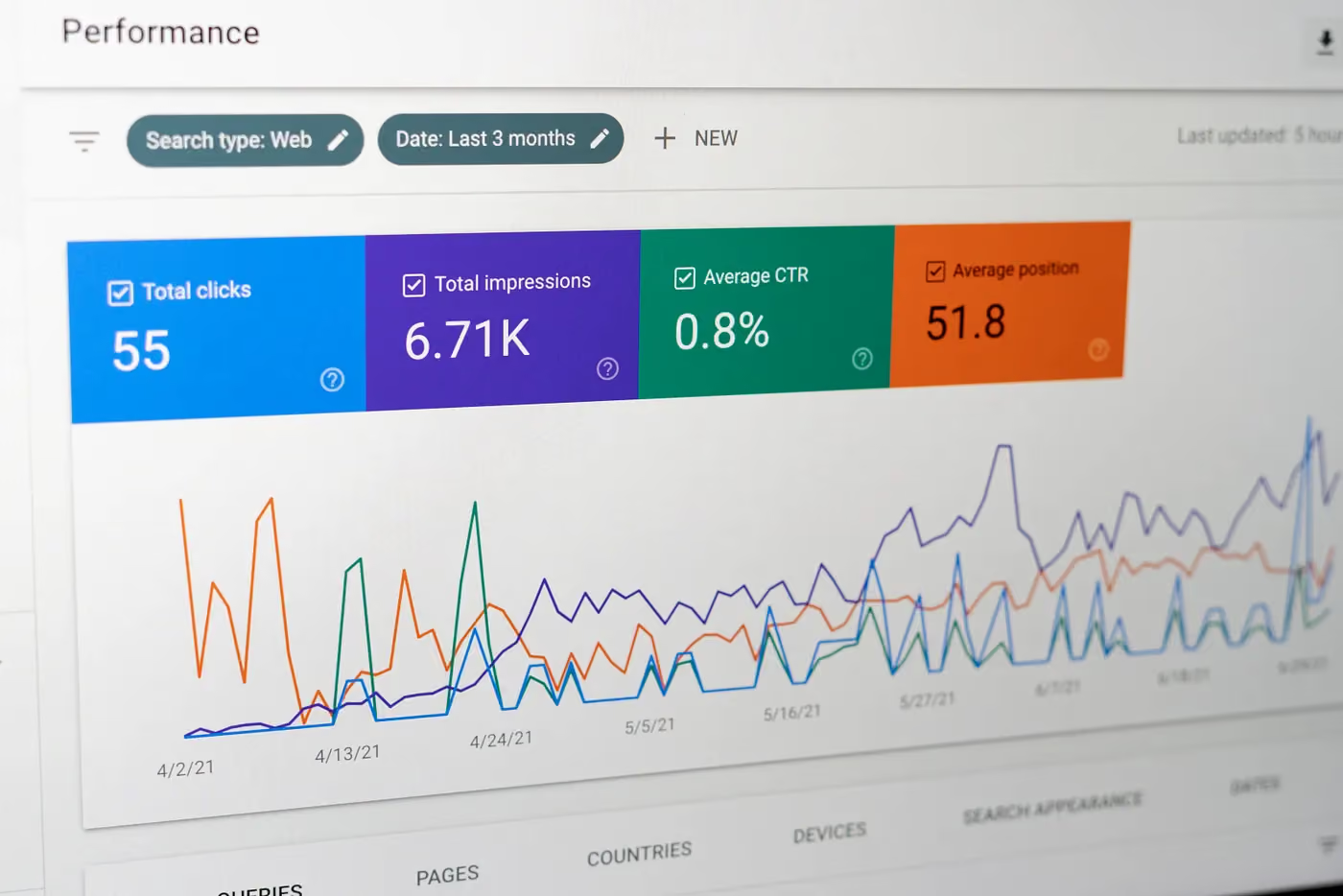
- Google Search Console: shows you indexing problems, click numbers, rankings
- Hotjar or Microsoft Clarity: analyse user behaviour on the page (scroll, clicks, exits)
- Screaming Frog SEO Spider: uncovers technical SEO issues
None of these tools automatically solve the problems for you. But they show you where you can start. With identified problems, you can also define the goal of your website optimisation much more precisely.
Best practices for sustained website optimisation
- Think from the user’s perspective, not from an internal one. What are they looking for? What information should they find? How can they navigate easily?
- Work with data, not gut feeling. Use the tools mentioned above to track down the issues.
- Give changes time to take effect. SEO improvements in particular take a while to become visible.
- Document what you have changed. This makes it easier to undo steps if necessary or to inform a service provider of your attempts.
Involve a freelancer or agency
If you can already narrow down the optimisation needs of your website very precisely, a specialist or freelancer can often help you very effectively. They address the problem in depth, such as targeted SEO optimisation or a technical overhaul.
Make sure that the service provider already has references and has been well reviewed. After all, you are sometimes giving them deep access to your website’s system, which comes with a great deal of responsibility.
Working with an agency is an option if you have uncovered many problem areas or simply don’t know exactly what is wrong with your website. Web design and programming agencies are generally set up so that they have a specialist on their team or on hand for every type of problem that arises.
Is your website very outdated, has no chance on Google and has been a loss-making venture for a long time? If you want a fresh start and want your website to be where many of our customers already are, we can help you.
Axisbits creates high-end websites for start-ups, scale-ups and SMEs. We give you honest advice, plan your project and implement it in full. Ongoing maintenance and later updates are also in the right hands with us.
We offer you high-end web design for companies. You can find successful websites of our customers in our portfolio.
{{fs-btn-cta}}
Wir schaffen leistungsstarke Plattformen und Websites für Startups, Scale-Ups und KMUs, von Konzept bis Go-Live.
We take over your website project and ensure a high-class design and the best search engine optimization.
Optimize your website — frequently asked questions and answers
Test the loading time on a normal smartphone, but without Wi-Fi. If noticeable waiting times occur, an analysis with performance tools is worthwhile to narrow down the causes.
It is often enough to structure existing content better, adapt it in a targeted manner and prepare it in a technically clean manner. It is important that each page has a clear topic and headline structure and is understandable to search engines.
Pay attention to high bounce rates and a very short session duration per user. If users lack orientation or important content cannot be found quickly, this can be a design problem.
Users are already finding your site and viewing the content. With a clear call to actions (CTA), encourage them to get in touch or take other actions (click on the link, fill out the form, download the asset, etc.). Another lever is building trust, for example through real customer reviews, certified seals and other positive reviews.
More articles

Many teams experience Sprint Planning in one of two extreme ways: either as an endless meeting that drags on for three hours and still provides no clarity, or merely as a ticket-shuffling exercise in Jira that could just as easily have been handled via email. Neither of these approaches aligns with the true purpose of Sprint Planning.

According to the swissICT Digital Excellence Report, only 35 percent of Swiss companies are on track with their digital alignment. For 26 percent, there is significant need for action (Source: swissICT). Companies invest in tools, cloud services, and AI pilot projects without a plan that holds it all together. The result: fragmented system landscapes, duplicated work, and budgets that don't flow where they have the most impact. The right IT strategy is the answer to this.

Artificial intelligence is now an established tool in software development, integrated directly into the programming environment. Developers spend less time writing boilerplate code and can instead focus on how the different parts of an application logically interact.