HubSpot explained: Features, costs and use in SMEs
HubSpot describes itself as a customer platform. This means software that brings together all of your company's important customer data in one place and makes it available to all departments. The core is Smart CRM: a shared database that stores contacts, companies, sales opportunities and interactions.

HubSpot at a glance:
- HubSpot is a software platform for customer relationships (Customer Relationship Management) that maps the entire customer lifetime cycle.
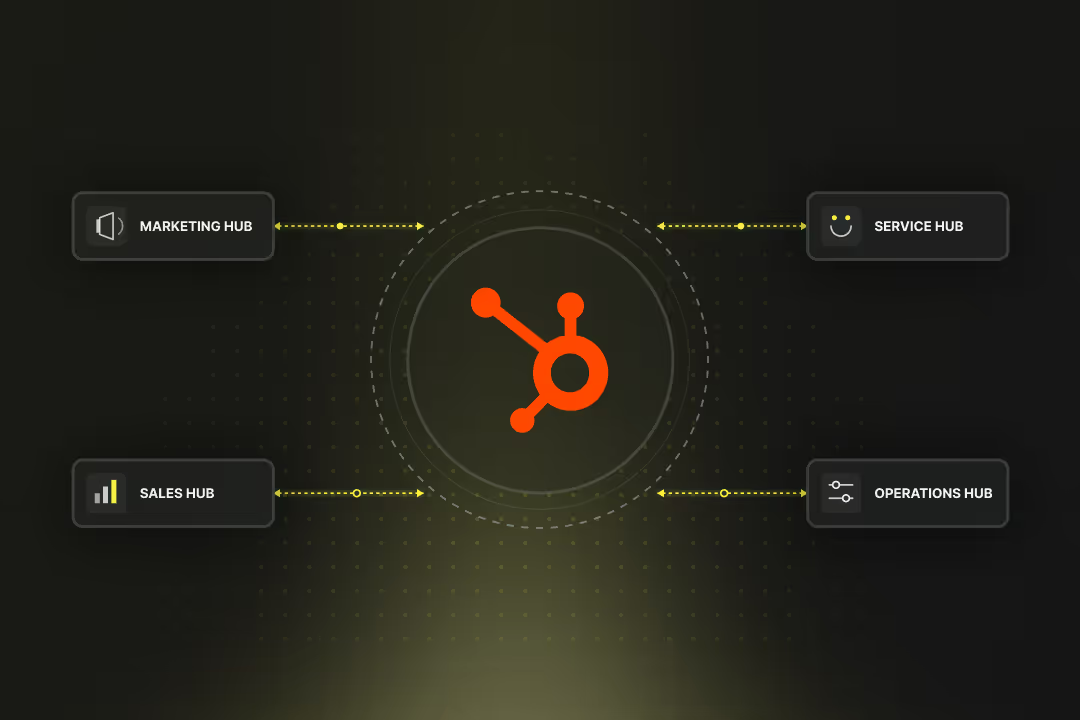
- HubSpot is built around the Smart CRM as its core plus six functional modules, called Hubs, which can be added as needed: Marketing, Sales, Service, Content, Data and Commerce.
- You can start with HubSpot free using Free or affordably with Starter, and upgrade to Professional or Enterprise when needed.
- The costs depend on Seats (user licenses) and, in the Marketing Hub, also on contacts.
- For Professional and Enterprise packages, onboarding is mandatory — either directly with HubSpot or through a partner.
- Axisbits is an official HubSpot Solution Provider and supports you with implementation, website build-out and automation.
How is HubSpot structured?
The Smart CRM is the core of HubSpot. All information about contacts, companies, deals and interactions comes together here. Every department accesses the same database. Marketing, sales and service therefore work with the same information.
Built on top of this are six standalone Hubs. Each Hub covers an area such as lead generation, sales processes or customer service. Together they form a system that maps the entire customer lifecycle: from the first enquiry to the long-term customer relationship.
To use the Hubs in HubSpot, Seats (= user licenses) are assigned. A Seat corresponds to a user with access to certain functions. There are different types:
- Core Seats: for central modules such as Marketing, Content and Data.
- Sales, Service and Commerce Seats: for the respective team in these Hubs.
- View-only Seats: for people who need to view data but don't need to (or shouldn't) edit anything.
In addition, HubSpot assigns so-called Credits. These serve as a quota for AI-powered functions, for example for generating text or analysing large amounts of data. Depending on the package you choose, different amounts of Credits are available.
What are the benefits of HubSpot?
HubSpot's strength lies in the combination of a central CRM and modular Hubs. You work with a unified database, avoid running multiple separate tools, and can expand step by step via the Hubs. On top of that come automations and AI functions that take over routine tasks.
- HubSpot unifies marketing, sales, service, content, data management and commerce in a single platform.
- All departments access the same customer data. A contact recorded as a lead in marketing appears in sales and service with the same information.
- You can start with one Hub and add more Hubs later. This makes HubSpot suitable for both small teams and large companies.
- HubSpot builds AI features directly into the Hubs: writing and adapting text, an AI agent for research and outreach, a customer agent for routine enquiries and ticket sorting.
- Leads can be automatically segmented, tasks assigned or notifications sent.
- HubSpot offers over 1,000 extensions and integrations. These let you connect Gmail, Outlook or Slack as well as many other tools.
- All Hubs come with their own reports, which can be combined into dashboards. The result is a consistent view of the customer lifecycle.
Which Hubs does HubSpot offer?
HubSpot consists of six modules, the so-called Hubs. Each Hub covers its own area of responsibility. Companies can start with one Hub and add more later. All Hubs share the same Smart CRM.
Marketing Hub in HubSpot
The Marketing Hub bundles tools for lead acquisition and nurturing. These include:
- Email campaigns
- Forms
- Landing pages
- Social media management
- Ad management
- Marketing automations
Typical use of the Marketing Hub in HubSpot: winning new contacts, engaging prospects with relevant content and developing them step by step into customers.
Sales Hub in HubSpot
In the Sales Hub, your sales teams manage their pipelines and deals. It offers functions for:
- Quote and forecast management
- Outreach sequences
- Calling features
- Playbooks to support the sales process
Notable feature: AI-powered tools such as the Prospecting Agent (Breeze) allow recurring tasks to be automated.
Service Hub in HubSpot
HubSpot's Service Hub is focused on customer support. It includes:
- Ticket system
- Omnichannel communication, for example via email, chat, WhatsApp
- Knowledge base
- Customer satisfaction survey tools
For larger teams, there are SLA functions and AI support, such as the Customer Agent, which automatically answers or pre-sorts service requests.
Content Hub in HubSpot (formerly CMS Hub)
The Content Hub in HubSpot serves as a website and content management system. You can use it to create, personalise and optimise websites, blogs and landing pages.
The SEO tools help you improve your visibility in search engines. With AI features, you can generate text or adapt and optimise existing content. Multi-language and multi-site setups are also possible.
Data Hub in HubSpot (successor to Operations Hub)
The Data Hub is about data quality and integration. Contact and company data from different systems can be synchronised, cleaned and enriched.
Typical functions include deduplication, transforming data, or importing events from external sources. This turns the CRM into a data foundation for all teams.
Commerce Hub in HubSpot
The Commerce Hub covers the financial and transaction processes. Here you can create quotes, issue invoices, manage subscriptions and process payments.
Particularly interesting for B2B: CPQ functions (Configure, Price, Quote) and electronic signatures, so that quotes can be accepted directly online.
What are the limits of HubSpot?
The limits of using HubSpot are primarily financial. Getting started is affordable at first, but monthly costs rise as your requirements grow.
- Costs as you grow: HubSpot feels affordable at the start, especially with Free or Starter (from around CHF 9 per month per license). But as soon as you need more contacts in marketing or additional Seats in Sales and Service, costs increase. Also keep an eye on the mandatory onboarding fees for the Pro and Enterprise packages.
- Licensing model with Seats and contacts: Billing is based on the number of user licenses (Seats) and, on top of that, on marketing contacts in the Marketing Hub. As your team grows or you import a lot of leads, you may need to upgrade quickly.
- Add-ons and limits: Certain features such as transactional emails, dedicated IPs or higher workflow limits are only available at an additional cost. You should therefore check whether the standard limits are sufficient for your needs.
Tip: We are an official HubSpot Solution Provider and help you choose your packages, licenses and Hubs. This ensures that you only pay for what actually moves your team forward.
What does HubSpot cost?
The costs of HubSpot depend on two factors: licenses (= Seats) and marketing contacts.
- Licenses/Seats: For every user who actively works in the system, you need a license. Depending on the Hub, these are Core Seats (Marketing, Content, Data) or specific Seats for Sales, Service and Commerce.
- Marketing contacts: In the Marketing Hub you additionally pay by contact tier. The higher your contact volume, the higher the monthly cost.
HubSpot pricing examples
HubSpot lists its prices in US dollars and in Europe in euros. Here you'll find the conversion to Swiss francs.
- HubSpot Free: free, with basic features and HubSpot branding.
- HubSpot Starter: from around CHF 7 per Seat per month. Marketing Hub Starter includes 1,000 marketing contacts.
- Marketing Hub: CHF 640 per month, 3 Seats included, 2,000 marketing contacts (Professional). With 5 Seats and 10,000 marketing contacts, CHF 2,880 per month (Enterprise).
- Sales Hub: CHF 72 per Seat per month (Professional). With 5 Seats, CHF 120 per Seat per month (Enterprise).
On top of that come the add-ons you choose, such as a dedicated IP for emails, additional workflows or more reporting capacity. Also factor in the Commerce Hub fees if you process payments (from CHF 80 per month per Seat).
What's important: the entry costs often look manageable, but the total always depends on how many Seats you need and how many contacts you manage in marketing.
Is HubSpot right for me?
HubSpot is built so that you can start small and grow later. Getting started works best when you let a HubSpot partner guide you. That way you enable your team to deliver results much faster.
- If you run a small business: with the Free or Starter version you can run your first campaigns, maintain contacts and run your website in the Content Hub. That's enough to professionalise the basics of marketing and CRM at the start.
- If you have a growing team: the Professional packages make sense as soon as you need automations, have several colleagues collaborating in sales, or want to scale your marketing. This is where the strengths of workflows, reporting and AI features come through.
- If you run a larger company: the Enterprise packages give you governance features, higher limits and more control. The extended options for permissions, workflows and integrations matter particularly for larger marketing or service teams.
HubSpot pricing example for SMEs
A machine manufacturer with 120 employees wants to connect marketing and sales more closely and use HubSpot.
- Four colleagues work in Marketing Hub Professional: three Seats are included in the package, an additional Core Seat costs CHF 36 per month. Together, approx. CHF 676 per month.
- Eight salespeople sit in Sales Hub Professional, each with their own Seat at CHF 72 per month. Together, approx. CHF 576 per month.
- The managing director uses a free view-only Seat to see revenue and pipeline.
In total, this comes to around CHF 1,252 per month, plus one-off onboarding fees of around CHF 2,400 for Marketing Pro and around CHF 1,200 for Sales Pro.
Making it easier to get started with HubSpot with a HubSpot partner
HubSpot brings Customer Relationship Management and the entire Customer Lifetime Cycle together in one piece of software. You work with a shared database and can add Hubs as needed. For SMEs this means: a system that grows with you, from the first lead to lasting customer loyalty.
Onboarding is mandatory for the Professional and Enterprise packages. You can do this directly with HubSpot or through a certified partner. The advantage of using a partner:
- The setup is tailored to your existing processes.
- You only book what actually gives your team an advantage.
- Integrations and migrations are carried out with experience.
- You receive a kick-off training and then ongoing support for your team.
Axisbits is an official HubSpot Solution Provider. We build your entire HubSpot setup, including CRM, CMS and Marketing Hub as well as websites, landing pages and A/B testing.
We at Axisbits have been working with HubSpot ourselves for years and are now an official HubSpot partner for Switzerland. Want your team to get started with HubSpot quickly? Then get in touch with us!
{{fs-btn-cta}}
Wir schaffen leistungsstarke Plattformen und Websites für Startups, Scale-Ups und KMUs, von Konzept bis Go-Live.
We are a partner and official HubSpot Solution Provider, set up your HubSpot setup and get your team up and running quickly!
HubSpot — Common Questions and Answers
HubSpot works for both. You can start small with Free or Starter and switch to Professional or Enterprise as your needs grow. Many SMEs rely on a combination of marketing and sales hub.
No, this is not necessary for Free and Starter. However, onboarding is mandatory for Professional and Enterprise. You can do this directly at HubSpot or through an official partner. A partner has the advantage that they adapt the setup to your processes and can sometimes give you cost advantages.
In addition to the monthly fees for seats and marketing contacts, add-ons can be added, for example for dedicated IP addresses, transactional emails or higher limits for workflows and reports. Onboarding fees are also mandatory for Pro and Enterprise packages.
Yes, hundreds of integrations are available via the HubSpot App Marketplace, from email providers such as Outlook and Gmail to project management or financial systems. Many standard integrations can be used at no additional cost.
Professional and enterprise packages include AI-based features such as content generation in the Content Hub, the Prospecting Agent in the Sales Hub or the Customer Agent in the Service Hub.
Yes, you can add or remove seats and add more hubs. Contact levels in the Marketing Hub can also be switched up or down. It is only important that you comply with the agreed minimum terms when canceling.
More articles
Digital transformation in SMEs is the answer to the acute shortage of skilled workers and your customers' increasing expectations for speed. You restructure your internal infrastructure so that as many processes as possible are automated and all information is available and synchronized for all departments.