Set up HubSpot workflows and use triggers
Workflows in HubSpot are the most important tool for automating recurring tasks and mapping processes efficiently. Without this kind of automation, unclear structures, missing standards and wrongly set conditions quickly create chaos.

HubSpot Workflow: Key points at a glance
- Workflows are HubSpot's automation tool for processing contacts, companies, deals or tickets with actions based on triggers.
- Requirements: The workflow editor is only available in the Professional and Enterprise tiers. Starter only allows simple automations.
- Trigger & Enrollment: Records are enrolled based on defined criteria. Depending on the setting, this can happen once or multiple times.
- Actions: From sending emails to tasks and record updates through to webhooks, custom code and AI-based Data Agent actions.
- Examples of workflows: lead nurturing, lead routing, deal stage automation, ticket management, data cleansing.
- AI integration via the HubSpot Data Agent Breeze, for example for Summarize, Research or Custom Prompt.
What are workflows in HubSpot?
HubSpot Workflows are an automation tool within the HubSpot platform. Workflows make it possible to automatically process records such as contacts, companies, deals, tickets or custom objects.
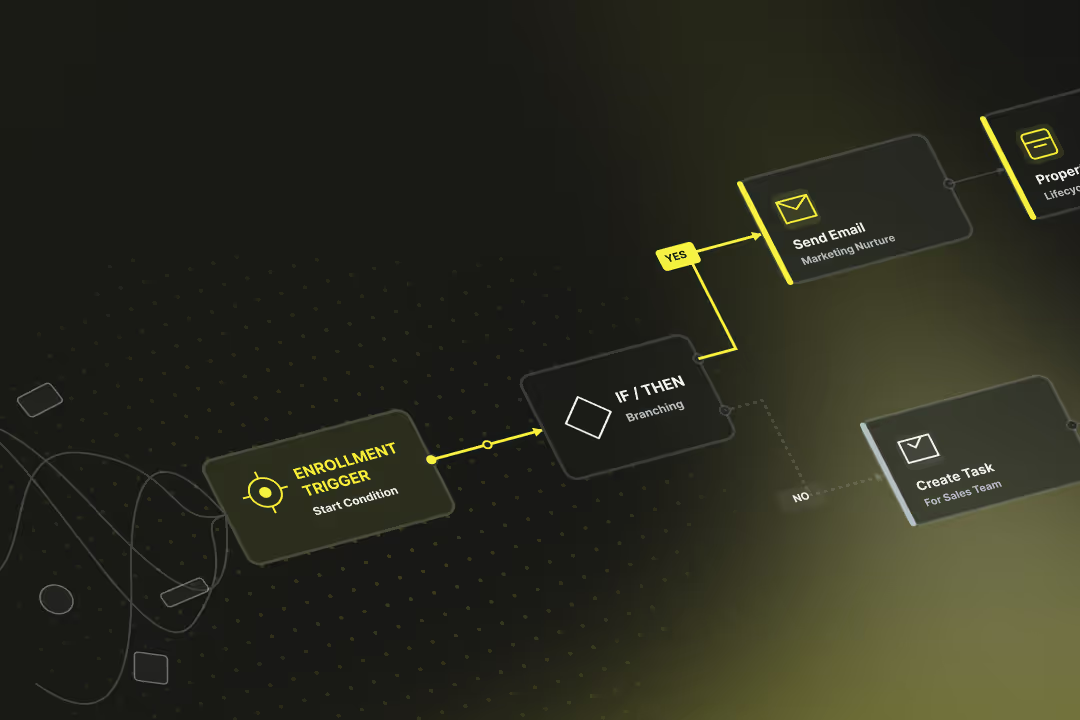
The basis is always an enrollment trigger, for example when a property is set or a form has been submitted. Once a record is enrolled, it runs through the defined actions, delays and branches of the workflow.
Access to the Workflow editor is only available in the Professional and Enterprise versions of the HubSpot Hubs (Marketing Hub, Sales Hub, Service Hub, Operations Hub, Data Hub, Commerce Hub and Smart CRM). In Starter or Free you can only use simple, predefined automations — you cannot create your own workflows.
Distinction: Workflows vs. sequences in HubSpot
- Workflows automate processes in marketing, sales, service or operations. They are based on records from the CRM, enable mass automation, and can map complex logic with if/then branches, webhooks or AI actions.
- Sequences are used exclusively in sales for 1:1 communication from the connected personal mailbox. As soon as a person replies or books a meeting, the sequence automatically ends.
How do I create a workflow in HubSpot?
You create a workflow in HubSpot by going to Automation > Workflows, creating a new workflow, setting the object type and enrollment triggers, configuring re-enrollment and actions, reviewing the settings, and publishing the workflow after testing.
- Start a new workflow
- Menu: Automation > Workflows > Create Workflow.
- Choice: From scratch, With AI (Breeze Assistant) or From template.
- Select object type and enrollment triggers
- Choose the record type: Contact, Company, Deal, Ticket or Custom Object.
- Define the criteria that enrol records: filter-based, event-based, schedule-based, or webhook-based.
- Configure re-enrollment and unenrollment
- Decide whether a record can be enrolled again when it meets the criteria once more.
- Define the conditions that automatically unenrol a record mid-workflow.
- Add actions
- Standard actions: send email, set properties, create tasks, assign owners.
- Advanced actions: delays, if/then branches, webhooks, custom code, AI-based Data Agent actions.
- Tip: for analytics-based branches (e.g. page views), add a delay of approximately 80 minutes before the branch so analytics data has time to update.
- Manage settings
- Set execution windows (days of the week, times) and pause dates.
- Configure notification preferences and monitoring.
- Test
- Use the workflow editor's test function to simulate how a specific record runs through the workflow before it goes live.
- Review and publish
- At publish, decide whether to enrol existing records that already meet the criteria immediately, or only records that meet the criteria from that point forward.
How do re-enrollment triggers work in HubSpot Workflows?
The trigger and enrollment logic in HubSpot Workflows determines when and how records are enrolled in a workflow. By default, each record is enrolled only once; running through it again is possible when re-enrollment is explicitly activated.
Trigger types in HubSpot Workflows
- Properties: enrollment when a field has a specific value or changes.
- Events: for example form submission, page view, interaction with marketing email.
- List membership: enrollment as soon as a contact matches a specific list.
- Date/time: scheduled enrollment on a specific day or relative to an event.
- External sources: webhooks or app actions from integrations.
Re-enrollment in HubSpot Workflows
By default, a record runs through a workflow only once. With re-enrollment, you can specify that a record is enrolled again when the defined criteria are met once more.
Example: “When property X = Yes” → can trigger again when the value is later set back to Yes.
Manually enrolling records in a HubSpot Workflow
Records can be enrolled in a workflow manually, independently of triggers.
Important: if a record has already run through, re-enrollment must be active — otherwise it will not be re-enrolled.
Suppression and unenrollment in HubSpot Workflows
With suppression lists, specific contacts or companies can be excluded from the outset. Workflows can also be set up so that records are automatically unenrolled as soon as they reach a defined goal (e.g. deal won).
Testing the enrollment logic in HubSpot Workflows
HubSpot offers a test function to simulate whether a specific record meets the trigger conditions. This way, you can check before activation whether the re-enrollment triggers fire correctly.
What actions are there in HubSpot Workflows?
HubSpot Workflows offer numerous actions for automatically processing records. These include standard actions such as sending emails or tasks for colleagues, as well as advanced functions like webhooks, custom code and AI-powered Data Agent actions. Which actions are available depends on the selected Hub and the licence tier.
Standard actions in HubSpot Workflows
- Send marketing emails, only in Marketing Hub Professional and Enterprise.
- Send WhatsApp messages (Marketing or Service Hub Professional/Enterprise, with a linked WhatsApp channel).
- Create tasks for other users in HubSpot CRM.
- Set properties or copy them, for example to update a lead's status.
- Create records, for example a new deal or ticket.
- Assign or rotate owners.
- Change marketing status (manage marketing contact status).
Advanced actions in HubSpot Workflows
- If/then branches: logic paths depending on conditions.
- Delays: time-based control of action execution.
- Trigger webhook: send data to external systems (Operations Hub/Data Hub Pro+).
- App actions: integration with third-party apps from the HubSpot Marketplace.
- Enroll in another workflow or unenroll from a sequence (Sales/Service Enterprise).
AI actions in HubSpot Workflows
Through the Data Agent Breeze — HubSpot's internal AI model — records can be processed automatically. AI supplements the classic workflow actions with functions for analysis, categorisation and text creation.
- Data Agent Research: research information automatically.
- Data Agent Custom Prompt: generate custom AI output.
- Data Agent Summarize Records: for example, automatically summarise tickets or deals.
The results of these actions can then be reused in branches or as properties. Summaries can be saved as a property, classifications can be used for if/then branches, and generated content is available as input for further actions.
Availability of actions by HubSpot licence
- Professional plans: core actions such as emails, tasks, record updates, simple app actions.
- Enterprise plans: plus unenrollment from sequences, custom objects, extensive app integrations.
- Operations/Data Hub Pro+: webhooks, custom code, advanced data workflows.
Examples of workflows in HubSpot
HubSpot Workflows can be used in all Hubs for a wide range of use cases. Every workflow consists of a clear trigger, the associated actions and a defined goal.
Examples of workflows in the Marketing Hub
- Lead nurturing: contacts who have submitted a form receive a tiered email sequence with follow-up content.
- Re-engagement: contacts with no interaction in the last six months receive a campaign with a win-back offer.
- Webinar communication: webinar registrations trigger an automatic confirmation email, followed by reminders and a follow-up email after the event.
Examples of workflows in the Sales Hub
- Lead routing: new leads are automatically assigned to the next available sales rep according to round-robin logic. This ensures that all team members receive the same number of leads or tickets.
- Deal stages: when a deal moves to a specific stage, a task is automatically created for the responsible team member.
- Approvals: high-volume or special deals can be forwarded to a manager for approval.
What advanced features are available in HubSpot Workflows?
In addition to the standard actions, advanced functions are also available in HubSpot Workflows. These enable automations that cover more complex processes and connections to other systems.
- Webhook actions for data exchange with external systems
- App actions from the HubSpot Marketplace
- Custom Code Actions with Node.js or Python (Beta)
- Workflows API for management, deployment and monitoring
One important area is integrations with external applications. Webhooks can be used to send or retrieve data. With app actions from the HubSpot Marketplace, additional services can be integrated without having to write your own code.
In addition, HubSpot offers the option of building your own logic into workflows using Custom Code Actions. Node.js and, since 2025, Python (Beta) are available for this purpose. This allows API requests to be executed, data to be processed, or individual business rules to be implemented. Technical specifications such as runtime and memory limits should be kept in mind.
How do I keep an overview of my HubSpot Workflows?
To keep workflows clear and reliable, HubSpot provides management functions. Workflows can be organised into folders and cloned or moved as needed.
- Folders to better organise workflows
- Cloning and moving workflows or individual actions
- Analysing for insights into enrollments and conversions
- Suppression lists and goals to control data quality
For reviewing workflow results, there is the Analyse area. Here you can see metrics such as the number of enrollments, conversion rates or drop-off rates. In the settings, you can define which workflows should be monitored.
Rolling out HubSpot Workflows with a HubSpot partner
The workflows in HubSpot can take a huge amount of manual work off your plate. The more your HubSpot system is automated, the more your team can focus on direct customer contact.
Precisely because HubSpot Workflows reach deep into the CRM and steer many data flows, setting them up requires experience and an understanding of the platform. Mistakes in triggers, re-enrollment or data synchronisation can affect the entire process.
We at Axisbits have been working with HubSpot ourselves for years and are now an official HubSpot Solution Provider for Switzerland. Would you like HubSpot Workflows to make your team's work easier? Then get in touch with us!
We automate your inbound marketing system:
- Workflows and sequences for newsletters, retargeting, tracking.
- Handover from marketing to sales (email sequences, prospecting).
- Building websites and landing pages on HubSpot.
{{fs-btn-cta}}
Wir schaffen leistungsstarke Plattformen und Websites für Startups, Scale-Ups und KMUs, von Konzept bis Go-Live.
We are a partner and official HubSpot Solution Provider, set up your HubSpot setup and get your team up and running quickly!
HubSpot Workflow — Common Questions and Answers
No, you can only use the workflow editor in the Professional and Enterprise tiers. In the Starter version, simple, predefined automations are available.
Workflows automate marketing, sales and service processes for many records simultaneously. Sequences, on the other hand, are intended for 1:1 communication in sales, for example for personal email follow-ups sent from the mailbox.
By default, a record runs through a workflow only once. With re-enrollment, you can specify that the same record is enrolled again when it meets the conditions once more.
No, the “Send marketing email” action is only available in Marketing Hub Professional and Marketing Hub Enterprise. Other Hubs can send service messages or internal notifications, but not marketing emails.
More articles
Digital transformation in SMEs is the answer to the acute shortage of skilled workers and your customers' increasing expectations for speed. You restructure your internal infrastructure so that as many processes as possible are automated and all information is available and synchronized for all departments.